TL;DR

Get the little things that make your day delivered free with Prime
- Fast, free delivery on millions of items
- Prime Video, Amazon Music and more included
- Member-only deals all year
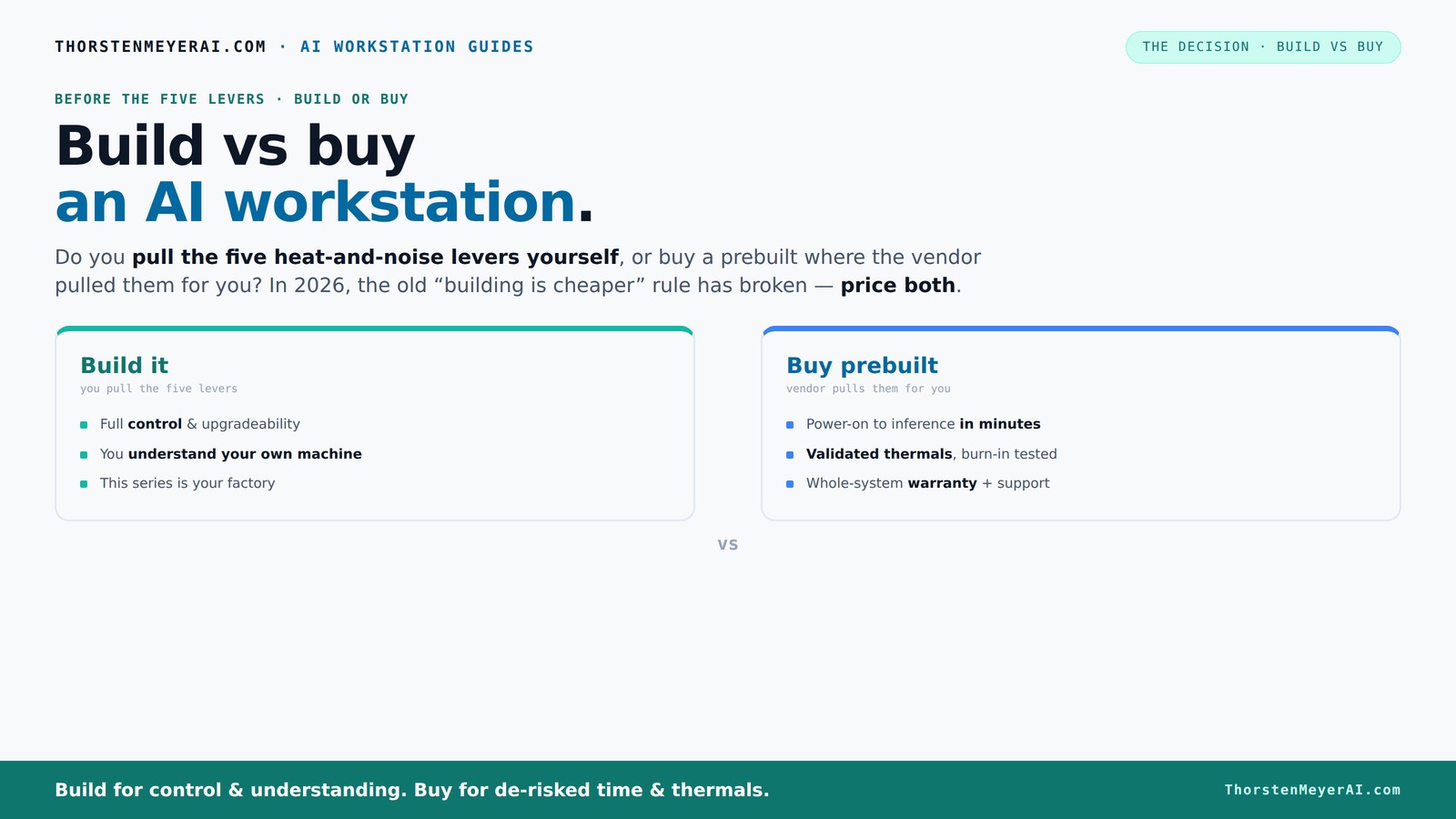
Prebuilt AI workstations are now often just as affordable as building your own, with added benefits like validated thermals and support. Your decision hinges on control, time, and how much you want to tinker versus rely on ready-made solutions.
Build vs buy
an AI workstation.
The real question behind this whole series: do you pull the five heat-and-noise levers yourself, or buy a prebuilt where the vendor pulled them for you? And in 2026, the old “building is cheaper” rule has broken. Match your situation in Part 3.
Key Takeaways
- Component shortages in 2026 make prebuilt AI workstations often as affordable as DIY, especially at high specs.
- Prebuilts offer validated thermals, support, and AI-specific optimizations that save time and reduce risk.
- Building your own gives full control over hardware, cooling, and upgrades, ideal for hobbyists and custom needs.
- AI hardware now includes power and efficiency features that benefit both enterprises and individual users.
- Your choice depends on whether you prioritize speed and support or control and customization.
As an affiliate, we earn on qualifying purchases.
Why the 2026 Shift Makes Prebuilt Systems More Attractive
Building your own AI workstation used to always save money. Not anymore. Recent component shortages and demand spikes have pushed prices sky-high for GPUs, RAM, and SSDs. Meanwhile, prebuilt vendors bought in bulk before the crunch, letting them offer systems that are often just as affordable — if not cheaper — than DIY.
For example, a high-end AI GPU like the NVIDIA A100 used to cost over $10,000. To explore options, visit build vs buy a prebuilt AI workstation. Now, prebuilt systems with similar specs can come in around $8,500 thanks to bulk discounts and efficient sourcing. That’s a game-changer.
This shift means your decision isn’t just about saving money — it’s about matching your workload, time, and comfort with building or buying a prebuilt AI workstation. Expect to see more AI-optimized features, validated thermals, and enterprise-ready support bundled into prebuilt options.
As an affiliate, we earn on qualifying purchases.
What Does a Prebuilt AI Workstation Do Better Than a DIY Build?
Prebuilts aren’t just about convenience anymore. They come with factory-validated thermals and cooling systems that you’d spend hours tuning yourself. Vendors like Lambda and BIZON run burn-in tests for 24–48 hours under load, ensuring the system won’t throttle during your long training sessions. This validation process matters because thermal throttling can significantly reduce performance during extended workloads, leading to longer training times or inconsistent results. When systems are tested thoroughly, it means you get reliable performance from day one, which is vital for research or production environments. Learn more about prebuilt AI workstations. They come with factory-validated thermals and cooling systems that you’d spend hours tuning yourself. Vendors like Lambda and BIZON run burn-in tests for 24–48 hours under load, ensuring the system won’t throttle during your long training sessions. This validation process matters because thermal throttling can significantly reduce performance during extended workloads, leading to longer training times or inconsistent results. When systems are tested thoroughly, it means you get reliable performance from day one, which is vital for research or production environments.
They often include AI-specific hardware and software optimizations, like ISV-certified drivers and pre-installed AI stacks, reducing setup time and troubleshooting. For example, a Dell AI PC might come with CUDA, TensorFlow, and Docker ready to go, saving you days of work. This integrated approach minimizes the risk of compatibility issues and ensures that your hardware and software work harmoniously, which is crucial for reducing downtime and accelerating project timelines.
Plus, they include support contracts that cover hardware failures, thermal issues, and even upgrades, giving peace of mind. If you're deploying multiple systems in a business, this predictability matters more than ever. Well-supported systems reduce maintenance headaches and allow you to focus on your core work rather than troubleshooting hardware or software problems.
As an affiliate, we earn on qualifying purchases.
When Building Your Own AI Workstation Still Makes Sense
If you love tinkering, building your own machine can be deeply satisfying. For guidance, see build vs buy a prebuilt AI workstation. It also offers the highest level of control over every component — from choosing a quiet GPU like the RTX 4090 to customizing cooling fans and airflow. This control allows you to tailor your system precisely to your specific needs, potentially squeezing out better performance or efficiency. However, this benefit comes with tradeoffs. Achieving optimal thermal performance and stability often requires extensive testing and fine-tuning, which can be time-consuming and complex, especially for newcomers.
Suppose you already have experience or a specific use case requiring custom hardware: a unique CPU, a specialized motherboard, or an unconventional cooling setup. DIY lets you tailor your system precisely to your workload, often squeezing out better performance per dollar. But this also means you’re responsible for troubleshooting compatibility issues, thermal management, and ensuring stability — risks that can lead to delays or suboptimal performance if not managed well.
Plus, if your budget is tight or you want to upgrade parts over time, building your own AI workstation gives you the flexibility to swap components without vendor restrictions. For instance, you might start with a single GPU and add a second later, something most prebuilts don’t support easily. This upgrade path can be cost-effective long-term but requires planning and technical know-how to avoid bottlenecks or compatibility issues.
As an affiliate, we earn on qualifying purchases.
Compare Cost, Performance, and Support — What Matters Most?
| Feature | Prebuilt AI Workstation | DIY Build |
|---|---|---|
| Cost | Often competitive or cheaper due to bulk buying, especially for high-end configs | Potentially cheaper if you source parts during sales or used market, but riskier with shortages |
| Time to Deploy | Minutes to hours — just turn on and install your AI stack | Days to weeks — sourcing, assembly, testing, troubleshooting |
| Support & Warranty | Single vendor support, warranty for entire system, quick RMA | Fragmented warranties; troubleshooting can be time-consuming |
| Customization | Limited to vendor options, but some allow minor tweaks | Complete control — CPU, GPU, cooling, power, upgrade paths |
| Performance | Optimized out of the box; validated thermals reduce throttling | Depends on your skill; potential for better tuning but more risk |
How AI-Optimized Hardware Is Changing the Game
AI PCs in 2026 aren’t just beefed-up gaming rigs. They come with features like ISV-certified drivers, power management tuned for inference, and AI-specific hardware accelerators. Dell and other vendors now offer systems with pre-optimized AI stacks, reducing setup time and improving power efficiency.
For example, some AI workstations consume up to 41% less power during inference compared to non-optimized PCs, according to Dell’s recent reports. This reduction in power consumption not only lowers operational costs but also decreases heat output, which can extend hardware lifespan and reduce cooling requirements. These efficiency gains are especially critical for data centers or mobile setups where power and cooling are at a premium. Additionally, optimized hardware and software configurations mean more consistent performance, minimizing variability during long training or inference runs. For businesses, this translates to better resource utilization and cost savings, while for researchers, it means more reliable results without constant manual tuning.
This AI-specific tuning makes prebuilts more appealing for businesses and researchers who need reliable, efficient performance without the hassle of manual tuning.
What Should You Do? Quick Decision Guide
- If you need a system fast, with support and validated thermals — buy a prebuilt.
- If you love customizing, have time, or want to optimize for specific workloads — build your own.
- If budget is tight and you’re willing to tinker — DIY can still save money, but check prices first.
- If you’re deploying multiple systems in a business — lean toward prebuilts for consistency and support.
Frequently Asked Questions
Is it cheaper to build or buy an AI workstation in 2026?
Thanks to component shortages and bulk buying, prebuilt systems are often just as affordable as DIY options. Always compare prices for your specific configuration before deciding.Which offers better performance for the money?
Both options can deliver top performance, but prebuilts come with validated thermals and optimized settings, often making them more reliable without extra tuning.How long does each option take to set up?
Prebuilts are ready in minutes to hours. Building your own can take days or weeks, depending on your experience and component availability.What are the risks of building your own system?
Potential risks include component incompatibility, thermal misconfiguration, and warranty fragmentation. Support depends on your troubleshooting skills and experience, which can lead to delays or suboptimal performance if not managed properly.Are prebuilt AI workstations less reliable or lower quality?
Not necessarily. Many prebuilt systems undergo thorough testing and include enterprise-grade cooling and power management, which can make them more dependable for sustained workloads. Their reliability often stems from manufacturer quality control, ensuring consistent performance and longevity.Conclusion
In 2026, the choice between build and buy hinges less on cost and more on your priorities — speed, control, or peace of mind. If you want a ready-to-run system with support, prebuilts are a smart move. But if you thrive on tinkering and customizing, building remains a rewarding challenge. The best machine is the one that fits your workflow, budget, and passion.NFL season / tailgating Picks
team gear
As an affiliate, we earn on qualifying purchases.
![A Better Way To Tie Your Gym Shorts. (Or Any Drawstring) [Video]](https://drunkenspeculation.com/wp-content/uploads/2026/07/a-better-way-to-tie-your-gym-shorts-or-any-drawstring-video-featured-560x300.jpg)