Smart plugs let you switch compatible lamps and appliances on a schedule or by voice, but the right choice depends on your smart-home system, outlet space, and need for energy data. My best overall pick is the Kasa Smart Wi-Fi Plug, 15A, 4-Pack, a practical choice for buyers who want a familiar app and a four-plug setup. For cross-platform flexibility, the Linkind Matter Smart Plug 4-Pack stands out, while the Tapo P110M adds energy monitoring for buyers who want to track usage. The main tradeoffs are Wi-Fi versus Matter compatibility, standard plugs versus space-saving designs, and basic control versus monitoring features. Read on for the full breakdown of all 15 smart plugs and guidance on choosing one that fits your devices and setup.

Get the little things that make your day delivered free with Prime
- Fast, free delivery on millions of items
- Prime Video, Amazon Music and more included
- Member-only deals all year
Key Takeaways
- Kasa’s 15A four-pack is my all-around choice for buyers who want multiple outlets covered without moving into a more specialized feature set.
- Linkind and Tapo bring Matter into the roundup, which may suit homes built around more than one smart-home platform; Tapo also includes energy monitoring.
- Energy monitoring is not standard across these picks: the Tapo P110M and Govee model explicitly named for monitoring are the clearest choices for usage data.
- Pack size changes the value equation: four-packs suit several rooms, while Kasa’s and Amazon’s two-plug options make more sense for a smaller rollout or a focused setup.
- Govee’s lineup spans different needs: its dual-plug model can serve two devices at one outlet, while its Wi-Fi and Bluetooth options add another control path beyond Wi-Fi.
| EIGHTREE 15A Wi-Fi Smart Plugs, 2-Pack |  | Best Compact Two-Pack | Quantity: 2 plugs | Maximum power: 1,800 W (listing also notes a conflicting wattage specification) | Operating voltage: 110 V AC | VIEW LATEST PRICE | See Our Full Breakdown |
| EIGHTREE Wi-Fi Smart Plug, 15A, 4-Pack |  | Best for SmartThings on a Budget | Model: ET01B-4 | Quantity: 4 plugs | Maximum amperage: 15 A in title; 10 A in specifications | VIEW LATEST PRICE | See Our Full Breakdown |
| GHome Smart Plug, 4-Pack, Wi-Fi, Works with Alexa and Google Home | 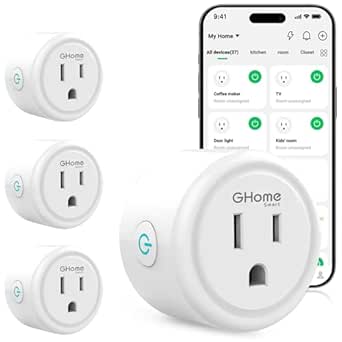 | Best for Shared Household Control | Model: WP3 | Quantity: 4 plugs | Dimensions: 2.1 x 2.1 x 1.1 inches | VIEW LATEST PRICE | See Our Full Breakdown |
| Linkind Matter Smart Plug, 4-Pack | 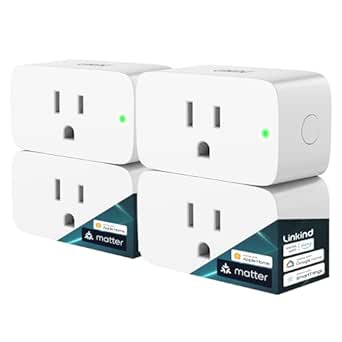 | Best for Matter Smart Homes | Model: LC09003256 | Pack size: 4 plugs | Plug type: Type A | VIEW LATEST PRICE | See Our Full Breakdown |
| Kasa Smart Wi-Fi Plug, 15A, 4-Pack |  | Best for Simple Everyday Scheduling | Model: HS103P4 | Pack size: 4 plugs | Operating voltage: 120 V AC | VIEW LATEST PRICE | See Our Full Breakdown |
| Govee Dual Smart Plug, 4-Pack, 15A Wi-Fi and Bluetooth |  | Best for Controlling Two Devices at One Outlet | Model: H5082 | Pack size: 4 plugs | Outlets per plug: 2, independently controlled | VIEW LATEST PRICE | See Our Full Breakdown |
| Amazon Smart Plug with Alexa |  | Best for Alexa-Only Setups | Included: One single-socket, 3-prong Wi-Fi plug | Input: 120 VAC, 60 Hz | Maximum output: 15 A | VIEW LATEST PRICE | See Our Full Breakdown |
| Kasa Smart Plug HS103P2, Wi-Fi, 2-Pack | 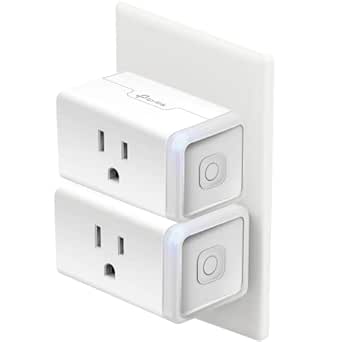 | Best for Mixed Alexa and Google Assistant Homes | Model: HS103P2 | Pack size: 2 plugs | Connectivity: 2.4 GHz Wi-Fi | VIEW LATEST PRICE | See Our Full Breakdown |
| Govee Smart Wi-Fi Plugs, 4-Pack |  | Best for Group Control Across Several Devices | Model: B5081 listing; H5083 app pairing instructions | Pack quantity: 4 plugs | Connectivity: Bluetooth and 2.4 GHz Wi-Fi | VIEW LATEST PRICE | See Our Full Breakdown |
| Govee 15A Wi-Fi and Bluetooth Smart Plugs, 4 Pack |  | Best for a Clearly Rated Four-Pack | Model: H5080 | Pack count: 4 plugs | Connectivity: Wi-Fi and Bluetooth | VIEW LATEST PRICE | See Our Full Breakdown |
| Govee Smart Plugs with Energy Monitoring, Wi-Fi and Bluetooth, 4-Pack |  | Best for Energy Tracking | Model: H5086 | Pack size: 4 plugs | Connectivity: Wi-Fi and Bluetooth; does not support 5 GHz Wi-Fi | VIEW LATEST PRICE | See Our Full Breakdown |
| EIGHTREE 15A Smart Plugs, 4-Pack, Alexa and Google Home Compatible | 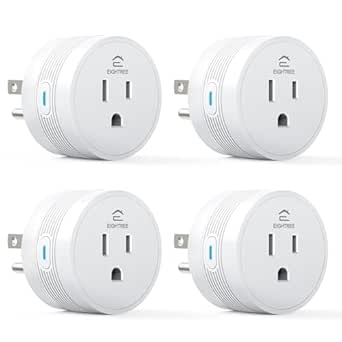 | Best for Multi-Platform Value | Pack size: 4 plugs | Maximum current: 15 A | Maximum power: 1800 W | VIEW LATEST PRICE | See Our Full Breakdown |
| Tapo P110M Matter Smart Plug with Energy Monitoring, 15A, 4-Pack |  | Best for Matter Smart Homes | Model: P110M | Pack size: 4 plugs | Maximum wattage: 1800 W | VIEW LATEST PRICE | See Our Full Breakdown |
| Kasa Smart Wi-Fi Mini Plug EP10P2, 15A, 2-Pack |  | Best for Simple Two-Outlet Automation | Model: EP10P2 | Quantity: 2 plugs | Maximum current: 15 A | VIEW LATEST PRICE | See Our Full Breakdown |
| GHome Smart Plug Mini, 4-Pack, Wi-Fi Outlet with App and Voice Control | 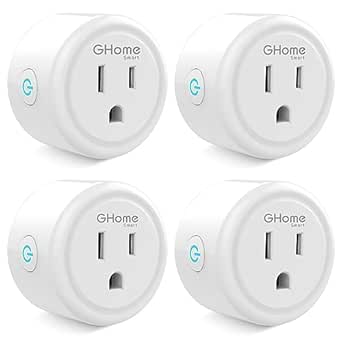 | Best for Lower-Power Devices | Model: WP3 | Pack size: 4 plugs | Connectivity: 2.4 GHz Wi-Fi | VIEW LATEST PRICE | See Our Full Breakdown |
| smart plug | Connectivity | Model | Certifications | Dimensions |
|---|---|---|---|---|
| EIGHTREE 15A Wi-Fi Smart Plugs | 2.4 GHz Wi-Fi | — | FCC, ETL | 1.9 x 1.2 x 1.9 inches |
| EIGHTREE Wi-Fi Smart Plug | 2.4 GHz Wi-Fi | ET01B-4 | ETL, FCC | — |
| GHome Smart Plug | Wi-Fi, 2.4 GHz only | WP3 | ETL, FCC | 2.1 x 2.1 x 1.1 inches |
| Linkind Matter Smart Plug | — | LC09003256 | FCC, ETL | — |
| Kasa Smart Wi-Fi Plug | 2.4 GHz Wi-Fi required | HS103P4 | — | 1.57 x 1.5 x 2.62 inches |
| Govee Dual Smart Plug | Wi-Fi and Bluetooth | H5082 | ETL, FCC, CA65 | 4 × 1.3 × 1.5 inches |
| Amazon Smart Plug with Alexa | — | — | — | 3.2 × 1.5 × 2.2 inches |
| Kasa Smart Plug HS103P2 | 2.4 GHz Wi-Fi | HS103P2 | — | 1.5 × 1.57 × 2.62 inches |
| Govee Smart Wi-Fi Plugs | Bluetooth and 2.4 GHz Wi-Fi | B5081 listing; H5083 app pairing instructions | ETL and FCC | — |
| Govee 15A Wi-Fi and Bluetooth | Wi-Fi and Bluetooth | H5080 | ETL and FCC | 1.34 × 2.57 × 1.49 inches |
| Govee Smart Plugs with Energy | Wi-Fi and Bluetooth; does not support 5 GHz Wi-Fi | H5086 | CA65, ETL, FCC, SDOC | — |
| EIGHTREE 15A Smart Plugs | 2.4 GHz Wi-Fi | — | FCC and ETL | 1.9 × 1.9 × 1.2 inches |
| Tapo P110M Matter Smart Plug w | Matter and 2.4 GHz Wi-Fi | P110M | — | — |
| Kasa Smart Wi-Fi Mini Plug EP1 | 2.4 GHz Wi-Fi; no hub required | EP10P2 | UL, RoHS, FCC, IC | — |
| GHome Smart Plug Mini | 2.4 GHz Wi-Fi | WP3 | ETL and FCC | 2 × 2 × 1 inch |
More Details on Our Top Picks
EIGHTREE 15A Wi-Fi Smart Plugs, 2-Pack
I’d pick this two-pack when space around the outlet matters more than buying in bulk. At 1.9 x 1.2 x 1.9 inches, these plugs are designed for crowded outlet areas, and the Smart Life app adds schedules, timers, and group control without a hub. Alexa, Google Assistant, and SmartThings support give it broader smart-home options than the Kasa HS103P4, which lists Alexa and Google Assistant but not SmartThings. The tradeoff is a smaller pack than the four-plug options from Kasa or Linkind, so it may not suit a home outfitting several rooms. I’d also verify the electrical rating before connecting a high-load appliance: the supplied listing flags conflicting wattage information despite stating a 1,800 W maximum. It also requires a 2.4 GHz Wi-Fi network.
Pros:- Compact dimensions suit narrow spaces and crowded outlets.
- Includes schedules, countdown timers, automation, and group control through Smart Life.
- Works with Alexa, Google Assistant, and SmartThings.
- Operates without a separate hub.
Cons:- The supplied product information flags a conflict in the wattage specification.
- Requires 2.4 GHz Wi-Fi.
- Two plugs provide less coverage than the four-packs in this roundup.
Best for: People who need a couple of compact plugs for crowded outlets and want SmartThings compatibility alongside voice control.
Not ideal for: Buyers outfitting several rooms at once, or anyone who needs an unambiguous power specification for a high-load appliance.
- Quantity:2 plugs
- Maximum power:1,800 W (listing also notes a conflicting wattage specification)
- Operating voltage:110 V AC
- Connectivity:2.4 GHz Wi-Fi
- Dimensions:1.9 x 1.2 x 1.9 inches
- App:Smart Life
- Voice assistants:Amazon Alexa, Google Assistant
- Smart home compatibility:SmartThings
- Certifications:FCC, ETL
Our verdict“Choose this two-pack for compact outlet access and SmartThings support, but clarify its power rating before using it with a high-load appliance.”
EIGHTREE Wi-Fi Smart Plug, 15A, 4-Pack
This EIGHTREE four-pack is a practical fit for buyers who want multiple scheduled outlets and SmartThings support without adding a hub. Smart Life handles setup and everyday controls, while Alexa and Google Assistant offer voice operation; Bluetooth-assisted setup is also listed. Compared with the Kasa Smart Wi-Fi Plug HS103P4, which lists Alexa and Google Assistant, this set adds SmartThings integration. Its main drawback is a specification conflict: the title says 15 A, while the supplied specifications say 10 A. I wouldn’t choose it for an appliance whose safe operation depends on knowing the precise current limit until that discrepancy is resolved. Setup also goes through Smart Life rather than a direct Alexa connection, and the plugs need 2.4 GHz Wi-Fi. The four-plug quantity is useful for spreading schedules across several rooms.
Pros:- Four plugs let buyers automate several outlets at once.
- Supports SmartThings, Alexa, and Google Assistant.
- Provides remote control, timers, and schedules through Smart Life.
- No separate hub is required.
Cons:- The title and specifications disagree on the maximum amperage: 15 A versus 10 A.
- Alexa setup requires Smart Life rather than a direct connection.
- Requires 2.4 GHz Wi-Fi.
Best for: SmartThings households that want four app-controlled plugs for lamps and other compatible household devices.
Not ideal for: Buyers connecting equipment that requires a confirmed 15 A rating, or anyone who wants direct Alexa setup without the Smart Life app.
- Model:ET01B-4
- Quantity:4 plugs
- Maximum amperage:15 A in title; 10 A in specifications
- Connectivity:2.4 GHz Wi-Fi
- App:Smart Life
- Voice assistants:Amazon Alexa, Google Assistant
- Smart home integration:SmartThings
- Hub required:No
- Certifications:ETL, FCC
Our verdict“Pick this set for four SmartThings-compatible plugs, but confirm the amperage specification before connecting higher-load devices.”
GHome Smart Plug, 4-Pack, Wi-Fi, Works with Alexa and Google Home
The GHome four-pack stands out for households that want to share access and control plugs in groups, not just switch them individually. Its app options include GHome, Smart Life, and Tuya, and the listing supports family access along with schedules and timers. That gives it a different emphasis from the Kasa HS103P4, which centers on Kasa app control and lists Alexa and Google Assistant but not the same family-sharing feature. The cost of that flexibility is a more involved setup: the plugs must first be connected through the GHome app before linking to Alexa or Google Home. They also work only on 2.4 GHz Wi-Fi, and the stated 1,200 W capacity is lower than the 1,800 W listed for Kasa and Linkind. I’d reserve them for compatible lower-load devices and check appliance requirements before use.
Pros:- Supports sharing access with family members.
- Group control makes it easier to operate multiple plugs together.
- Works with Alexa and Google Assistant, with GHome, Smart Life, and Tuya app options.
- Includes schedules and timers.
Cons:- Must be set up in the GHome app before linking to Alexa or Google Home.
- Limited to 2.4 GHz Wi-Fi.
- Listed at 1,200 W, below the 1,800 W capacity specified for Kasa and Linkind.
Best for: Households where several family members need shared app access and grouped control of lamps or other compatible devices.
Not ideal for: People seeking a direct voice-assistant setup or a plug with the 1,800 W capacity listed by some alternatives.
- Model:WP3
- Quantity:4 plugs
- Dimensions:2.1 x 2.1 x 1.1 inches
- Connectivity:Wi-Fi, 2.4 GHz only
- Compatible apps:GHome, Smart Life, Tuya
- Voice assistants:Amazon Alexa, Google Assistant
- Operating voltage:120 V
- Wattage:1,200 W
- Certifications:ETL, FCC
Our verdict“Choose GHome when family sharing and grouped control matter more than simpler setup or a higher listed wattage capacity.”
Linkind Matter Smart Plug, 4-Pack
Linkind is the lineup’s clearest choice for buyers building around Matter and multiple smart-home platforms. It lists Apple Home, Alexa, Google Home, and SmartThings, with local LAN control that can keep commands working when internet access is unavailable. That is a broader platform pitch than the EIGHTREE 15A 4-Pack, which supports SmartThings, Alexa, and Google Assistant but does not list Matter or Apple Home. Linkind’s flexibility comes with setup requirements: the listed platforms need a compatible Matter hub, and the network must support both 2.4 GHz Wi-Fi and IPv6. The AiDot app can work without a hub, but that is a different route from using those platform integrations. Its 15 A, 1,800 W rating and overload and short-circuit protections are useful on paper, though this is not the simplest pick for a single-platform household.
Pros:- Lists compatibility with Apple Home, Alexa, Google Home, and SmartThings through Matter.
- Local LAN control can provide operation when internet access is unavailable.
- Rated for 15 A and 1,800 W.
- Includes short-circuit and overload protection and fire-resistant materials.
Cons:- A compatible Matter hub is required for the listed smart-home platform integrations.
- Requires both 2.4 GHz Wi-Fi and IPv6.
- AiDot app use without a hub is a different setup path from Matter platform control.
Best for: Matter users with a compatible hub who want four plugs that can join Apple Home, Alexa, Google Home, or SmartThings.
Not ideal for: Buyers without a compatible Matter hub, IPv6-capable network, or interest in managing smart-home platform setup.
- Model:LC09003256
- Pack size:4 plugs
- Plug type:Type A
- Amperage:15 A
- Power capacity:1,800 W
- Wi-Fi:2.4 GHz only
- Network requirement:IPv6
- Compatible platforms:Apple Home, Alexa, Google Home, SmartThings
- Certifications:FCC, ETL
Our verdict“Choose Linkind if you already have a compatible Matter hub and want broad platform support; skip it if you want the simplest hub-free setup.”
Kasa Smart Wi-Fi Plug, 15A, 4-Pack
I’d choose the Kasa HS103P4 for a straightforward set of four plugs with app scheduling and familiar voice control. The Kasa app handles remote operation, while Alexa and Google Assistant support voice commands; no hub is listed as necessary. Compared with the Linkind Matter Smart Plug, Kasa skips broader platform reach such as Apple Home and SmartThings, but also avoids the compatible Matter hub requirement described for Linkind’s platform integrations. Its 1,800 W maximum gives buyers a clear stated capacity, unlike the conflicting amperage details on the EIGHTREE four-pack. The tradeoff is a narrower assistant list and a requirement for 2.4 GHz Wi-Fi. The app also has minimum operating-system requirements, which may rule it out for people keeping older phones or tablets in service. This is the more direct fit for basic schedules rather than cross-platform smart-home setups.
Pros:- Four plugs support schedules and remote control through the Kasa app.
- Works with Amazon Alexa and Google Assistant.
- No hub is required.
- Lists a maximum wattage of 1,800 W and UL certification.
Cons:- Requires a 2.4 GHz Wi-Fi connection.
- Lists Alexa and Google Assistant, but not Apple Home or SmartThings.
- The Kasa app requires Android 5.0 or later or iOS 10.0 or later.
Best for: Alexa or Google Assistant households that want four hub-free plugs for remote control, everyday schedules, and timers.
Not ideal for: Apple Home or SmartThings users seeking listed native compatibility, or buyers using Android versions older than 5.0 or iOS versions older than 10.0.
- Model:HS103P4
- Pack size:4 plugs
- Operating voltage:120 V AC
- Maximum wattage:1,800 W
- Connectivity:2.4 GHz Wi-Fi required
- Control methods:Voice, remote app, scheduling
- Compatible assistants:Amazon Alexa, Google Assistant
- Dimensions:1.57 x 1.5 x 2.62 inches
- Certification:UL
Our verdict“Pick Kasa for four uncomplicated, hub-free scheduled plugs if Alexa or Google Assistant covers your smart-home needs.”
Govee Dual Smart Plug, 4-Pack, 15A Wi-Fi and Bluetooth
The Govee Dual Smart Plug stands apart from single-outlet picks like the Amazon Smart Plug by giving you two independently controlled sockets in one compact body. That can simplify a lamp-and-fan setup without taking over two wall outlets, while app controls, schedules, timers, and Alexa or Google Assistant voice commands cover everyday automation. Wi-Fi and Bluetooth connectivity and the lack of a separate hub add flexibility, but setup still depends on a Govee Home account. Like the Kasa HS103P2 and Amazon plug, it only supports 2.4 GHz Wi-Fi, so it is not suitable for a 5 GHz-only network. I’d choose this four-pack when outlet capacity matters more than keeping every device on a separate plug; buyers who want a simpler single-socket option may prefer the Amazon model.
Pros:- Two independently controlled outlets in each plug
- Compact body fits a standard vertical outlet
- Supports app control, timers, schedules, Alexa, and Google Assistant
- Works without a separate hub
Cons:- Does not support 5 GHz Wi-Fi
- Requires a Govee Home account
- Its dual-outlet format may be unnecessary for buyers automating one device per socket
Best for: Households automating several pairs of small appliances that want each outlet controlled separately from one wall position.
Not ideal for: People with a 5 GHz-only Wi-Fi network or anyone who wants to avoid creating a Govee Home account.
- Model:H5082
- Pack size:4 plugs
- Outlets per plug:2, independently controlled
- Connectivity:Wi-Fi and Bluetooth
- Wi-Fi:2.4 GHz; no 5 GHz support
- Voice assistants:Alexa and Google Assistant
- Dimensions:4 × 1.3 × 1.5 inches
- Certifications:ETL, FCC, CA65
Our verdict“Choose this Govee pack when independently automating two devices from each wall position matters more than a simpler single-outlet design.”
Amazon Smart Plug with Alexa
The Amazon Smart Plug is the most focused choice here: it adds scheduling and voice control to one indoor device, but only within the Alexa ecosystem. Compared with the Kasa HS103P2, it gives up Google Assistant support, yet its Alexa app setup and physical on/off switch make it a straightforward fit for an Alexa-centered home. The single-socket body is compact enough to leave the neighboring outlet free, and the plug can reconnect to Alexa after power or Wi-Fi outages. No hub is needed, though the 2.4 GHz-only connection rules it out for networks that use only 5 GHz. I’d pick it over the multi-outlet Govee options when an uncomplicated Alexa-controlled lamp or fan is the goal; skip it if you need cross-platform voice control or smart-hub compatibility.
Pros:- Works with Alexa voice control, routines, timers, and schedules
- No smart home hub required
- Compact single-socket design leaves the adjacent outlet free
- Automatically reconnects to Alexa after power or Wi-Fi outages
Cons:- Does not work with other voice assistants or smart hubs
- Supports 2.4 GHz Wi-Fi only
- Indoor use only
Best for: Alexa households adding voice control and schedules to individual indoor lamps, fans, or other compatible devices.
Not ideal for: Google Assistant users, people seeking smart-hub compatibility, or buyers who need a plug for outdoor use.
- Included:One single-socket, 3-prong Wi-Fi plug
- Input:120 VAC, 60 Hz
- Maximum output:15 A
- Wi-Fi:2.4 GHz, 802.11 b/g/n; no 5 GHz support
- Compatibility:Alexa app and compatible Alexa devices
- Use:Indoor
- Dimensions:3.2 × 1.5 × 2.2 inches
- Weight:3.1 oz
- Warranty:1-year limited
Our verdict“Pick the Amazon Smart Plug for a simple, single-device addition to an Alexa-only home, but choose Kasa if you also need Google Assistant support.”
Kasa Smart Plug HS103P2, Wi-Fi, 2-Pack
The Kasa HS103P2 is a practical two-plug option for homes that use either Alexa or Google Assistant, giving it broader voice-assistant fit than the Amazon Smart Plug. Remote control through the Kasa app, schedules, and a countdown timer handle common lamp and fan routines without adding a hub. Its 15 A resistive rating at 120 V AC is useful to check against the device you plan to connect; it does not mean every appliance is an appropriate load. Unlike Govee’s dual-outlet H5082, these are separate single-outlet plugs, so each can go where needed but each occupies its own wall position. The tradeoff is familiar: 2.4 GHz Wi-Fi only, plus a stated operating temperature range of 32–104 °F. I’d favor this pack for flexible assistant compatibility and basic schedules, not for dual-outlet density.
Pros:- Works with both Amazon Alexa and Google Assistant
- Kasa app supports remote control, schedules, and countdown timers
- No hub required
- Two separate plug-in units offer flexible placement
Cons:- Requires a 2.4 GHz Wi-Fi connection
- Maximum load is specified as 15 A resistive at 120 V AC
- Separate units do not provide the two-sockets-in-one-body format of the Govee H5082
Best for: Alexa or Google Assistant households that want two separate plugs for indoor lamps, fans, or similar devices.
Not ideal for: Buyers with 5 GHz-only Wi-Fi or those seeking two independently managed outlets from one wall plug.
- Model:HS103P2
- Pack size:2 plugs
- Connectivity:2.4 GHz Wi-Fi
- Voice assistants:Amazon Alexa and Google Assistant
- Maximum load:15 A resistive at 120 V AC
- Dimensions:1.5 × 1.57 × 2.62 inches
- Operating temperature:32–104 °F
- Warranty:2 years
Our verdict“Choose the Kasa HS103P2 if you want two separate, schedule-ready plugs with Alexa and Google Assistant support rather than a dual-outlet unit.”
Govee Smart Wi-Fi Plugs, 4-Pack
The Govee Smart Wi-Fi Plugs four-pack suits buyers who want to schedule several devices and manage plugs together through one app. Bluetooth and 2.4 GHz Wi-Fi give it two connection methods, while Alexa and Google Assistant support keeps voice control broader than the Alexa-only Amazon Smart Plug. App-based family access can also help when multiple household members manage shared devices. Compared with the Govee H5080 four-pack, this model’s key caution is less about features and more about unclear electrical limits: the supplied information lists 10 A in the description and 11 A in the specifications. I would resolve that discrepancy with the manufacturer before connecting a load that approaches either figure. It also lacks 5 GHz Wi-Fi support. This is a sensible multi-device pick for lighter-duty setups, but not the one I’d choose when a clear, consistent amperage rating is a priority.
Pros:- Four plugs support multi-device automation
- Bluetooth and 2.4 GHz Wi-Fi connectivity
- Works with Alexa and Google Assistant
- App supports scheduling, group control, and family access
Cons:- Electrical rating conflicts between the description and specifications: 10 A versus 11 A
- Does not support 5 GHz Wi-Fi
- Plastic construction is specified without a stated fire-resistant material detail
Best for: Households that want app-based group scheduling and shared access for several lower-load devices.
Not ideal for: Buyers connecting higher-load appliances or anyone who needs an unambiguous amperage rating before purchase.
- Model:B5081 listing; H5083 app pairing instructions
- Pack quantity:4 plugs
- Connectivity:Bluetooth and 2.4 GHz Wi-Fi
- Voice assistants:Amazon Alexa and Google Assistant
- Voltage:120 V
- Plug type:Type B
- Certifications:ETL and FCC
Our verdict“Consider this Govee pack for grouped control of lower-load devices, but choose the H5080 instead if its stated 15 A rating better fits your needs.”
Govee 15A Wi-Fi and Bluetooth Smart Plugs, 4 Pack
The Govee H5080 four-pack combines a stated 15 A rating with app scheduling, group management, Bluetooth, and Alexa or Google Assistant control. That makes it a stronger fit for buyers who want several single-outlet plugs and a clearly specified rating than the other Govee four-pack in this lineup, whose supplied amperage figures conflict. Its compact design leaves the adjacent outlet free, unlike a bulky multi-socket arrangement, and ETL and FCC certifications are listed. The tradeoffs are the familiar Govee account requirement and 2.4 GHz-only Wi-Fi; Bluetooth does not change that Wi-Fi limitation. Compared with the dual-outlet Govee H5082, the H5080 gives you separate plugs rather than two sockets in one body. I’d choose it for straightforward whole-home scheduling across multiple individual devices, but not if you want to avoid the Govee app or need 5 GHz support.
Pros:- Four plugs support schedules and group management through the Govee Home app
- Works with Alexa and Google Assistant
- Bluetooth and Wi-Fi connectivity with no hub required
- Compact form leaves the adjacent outlet free; ETL and FCC certified
Cons:- Does not support 5 GHz Wi-Fi
- Requires the Govee Home app and an account
- Unlike the Govee H5082, each plug controls one outlet rather than two
Best for: Buyers automating several individual devices who want a four-pack with a stated 15 A rating and Alexa or Google Assistant support.
Not ideal for: People on 5 GHz-only networks, those who do not want a Govee Home account, or shoppers who prefer two outlets in one plug body.
- Model:H5080
- Pack count:4 plugs
- Connectivity:Wi-Fi and Bluetooth
- Wi-Fi:2.4 GHz; no 5 GHz support
- Voice assistants:Alexa and Google Assistant
- Amperage:15 A
- Dimensions:1.34 × 2.57 × 1.49 inches
- Material:ABS
- Certifications:ETL and FCC
Our verdict“Choose the H5080 for a four-pack of compact, individually placed plugs with a stated 15 A rating, provided 2.4 GHz Wi-Fi and a Govee account suit you.”
Govee Smart Plugs with Energy Monitoring, Wi-Fi and Bluetooth, 4-Pack
I’d choose this four-pack when knowing what an appliance draws matters as much as switching it remotely. The Govee Home app tracks power, current, and voltage, with energy history available for up to a year, giving it a clear advantage over the Kasa EP10P2, which focuses on scheduling and control rather than monitoring. Wi-Fi and Bluetooth connectivity, voice control, schedules, and group operation cover the everyday smart-plug basics without a hub. The tradeoff is that Bluetooth doesn’t remove the network limitation: setup still requires 2.4 GHz Wi-Fi, not 5 GHz. This is a stronger fit for someone who wants appliance-use data than for a buyer who only needs simple on/off automation.
Pros:- Monitors power, current, and voltage, with historical data available for up to one year.
- Includes four plugs with app, voice, schedule, and group controls.
- Works over Wi-Fi and Bluetooth without a separate hub.
- ETL- and FCC-certified, with fire-resistant materials listed in the product description.
Cons:- Does not support 5 GHz Wi-Fi.
- Energy monitoring and its historical data rely on the Govee Home app.
Best for: Households that want to track the energy use of several appliances and automate them through Alexa or Google Assistant.
Not ideal for: Buyers whose home network offers only 5 GHz Wi-Fi, or who want simple switching without energy data.
- Model:H5086
- Pack size:4 plugs
- Connectivity:Wi-Fi and Bluetooth; does not support 5 GHz Wi-Fi
- Voice assistants:Amazon Alexa and Google Assistant
- Voltage:110 V
- Current:15 A
- Plug type:Type B
- Certifications:CA65, ETL, FCC, SDOC
Our verdict“Pick this Govee pack if energy tracking is a priority; choose the Kasa EP10P2 instead if basic automation matters more than usage data.”
EIGHTREE 15A Smart Plugs, 4-Pack, Alexa and Google Home Compatible
This EIGHTREE four-pack makes sense for buyers who want four full-capacity plugs and more than one smart-home control route, without adding a hub. Through the Smart Life app, it supports Alexa, Google Home, and SmartThings, alongside schedules, countdown timers, and group control. That gives it broader stated platform compatibility than the Kasa EP10P2, which lists Alexa, Google Assistant, and SmartThings but comes as a two-pack. The EIGHTREE’s 1.2-inch thickness can also help in crowded outlet areas. The compromise is app dependence: setup and integration run through Smart Life, rather than a dedicated EIGHTREE app, and the plugs require 2.4 GHz Wi-Fi. Its 15 A rating suits higher-load household devices within the stated 1800 W maximum, but it’s not a 5 GHz option.
Pros:- Four plugs rated up to 15 A and 1800 W each.
- Supports Alexa, Google Home, and SmartThings through Smart Life.
- Offers schedules, countdown timers, app control, voice control, and group operation.
- Compact 1.2-inch thickness can suit crowded outlets.
Cons:- Requires 2.4 GHz Wi-Fi and does not support 5 GHz.
- Smart Life is required for setup and smart-home integration.
Best for: Smart-home households seeking four 15 A plugs with Alexa, Google Home, and SmartThings compatibility through one app.
Not ideal for: Buyers who prefer to avoid the Smart Life app, or whose Wi-Fi network does not provide 2.4 GHz connectivity.
- Pack size:4 plugs
- Maximum current:15 A
- Maximum power:1800 W
- Operating voltage:120 V
- Dimensions:1.9 × 1.9 × 1.2 inches
- Connectivity:2.4 GHz Wi-Fi
- Compatible platforms:Alexa, Google Home, and SmartThings
- Certifications:FCC and ETL
Our verdict“Choose this EIGHTREE pack for four 15 A plugs and SmartThings support, but skip it if you want setup outside the Smart Life app.”
Tapo P110M Matter Smart Plug with Energy Monitoring, 15A, 4-Pack
I’d put the Tapo P110M near the top of the list for a buyer building around different smart-home platforms. Matter compatibility connects its app, voice, and scheduled controls to Alexa, Apple Home, Google Home, and SmartThings, making it more flexible across ecosystems than the Govee H5086, which lists Alexa and Google Assistant. It also tracks energy use in the Tapo app and can trigger automatic shutoff at configured power thresholds, a useful way to limit operation when a connected device reaches a chosen level. The four-pack offers the same stated 1800 W capacity as the EIGHTREE pack, with energy monitoring added. The limits are 2.4 GHz Wi-Fi for connected operation and cost estimates that depend on the applicable electricity tariff and actual usage.
Pros:- Matter support spans Alexa, Apple Home, Google Home, and Samsung SmartThings.
- Energy monitoring includes statistics and charts in the Tapo app.
- Power thresholds can trigger automatic shutoff.
- Four-plug pack with a stated 1800 W capacity.
Cons:- Connected operation requires 2.4 GHz Wi-Fi.
- Electricity cost estimates depend on usage and the applicable tariff.
Best for: Households using Matter-compatible platforms, especially those combining Apple Home with Alexa, Google Home, or SmartThings.
Not ideal for: Buyers with 5 GHz-only Wi-Fi or those who need energy-cost estimates independent of their utility tariff.
- Model:P110M
- Pack size:4 plugs
- Maximum wattage:1800 W
- Connectivity:Matter and 2.4 GHz Wi-Fi
- Compatible platforms:Amazon Alexa, Apple Home, Google Home, Samsung SmartThings
- Control:App, voice, and scheduling
- Energy features:Usage statistics, charts, and configurable power thresholds for automatic shutoff
- Color:White
Our verdict“Choose the Tapo P110M for Matter-based control across several ecosystems plus energy monitoring, provided 2.4 GHz Wi-Fi is available.”
Kasa Smart Wi-Fi Mini Plug EP10P2, 15A, 2-Pack
The Kasa EP10P2 is the straightforward choice when a household needs a couple of dependable control points rather than a larger multipack. Its two-plug format keeps the purchase focused, while the Kasa or Tapo app, voice commands, schedules, timers, and Away Mode cover common routines. Compared with the four-plug EIGHTREE 15A Smart Plugs, this gives you fewer outlets to automate but avoids buying more plugs than you need. Its stated 15 A and 1800 W capacity matches that EIGHTREE pack, and the listed UL certification adds a useful safety detail. There’s no hub requirement. The main limitation is platform range: Alexa and Google Assistant are named for voice control, while the connection itself requires 2.4 GHz Wi-Fi, not 5 GHz.
Pros:- Two-plug pack suits smaller automation needs without requiring a larger set.
- Supports schedules, timers, and Away Mode.
- Can be controlled through the Kasa or Tapo app, with no hub required.
- Rated for up to 15 A and 1800 W; listed certifications include UL.
Cons:- Pack includes only two plugs, fewer than the four-plug EIGHTREE and Govee options.
- Requires 2.4 GHz Wi-Fi.
- Does not list Apple Home compatibility or energy monitoring.
Best for: People automating one or two household devices who want schedules, Away Mode, and app or voice control without a hub.
Not ideal for: Buyers outfitting several rooms at once, or anyone who needs a plug that connects to 5 GHz Wi-Fi.
- Model:EP10P2
- Quantity:2 plugs
- Maximum current:15 A
- Maximum wattage:1800 W
- Operating voltage:120 V AC
- Connectivity:2.4 GHz Wi-Fi; no hub required
- Voice assistants:Amazon Alexa and Google Assistant
- Certifications:UL, RoHS, FCC, IC
Our verdict“Pick the Kasa EP10P2 for a small, no-hub automation setup; choose a four-pack if you need to control devices throughout the home.”
GHome Smart Plug Mini, 4-Pack, Wi-Fi Outlet with App and Voice Control
This GHome four-pack is best treated as a compact, lower-capacity option for lamps and other devices that stay within its 10 A, 1200 W limit. That rating is the key difference from the 15 A, 1800 W EIGHTREE four-pack and Kasa EP10P2: those are better candidates for higher-load appliances, while the GHome set trades capacity for a small, one-inch-deep design. It includes app and voice control, schedules, auto-off timers, and group operation without a hub. There is a setup wrinkle: each plug must be connected to the GHome app before linking with Alexa or Google Assistant. It also requires 2.4 GHz Wi-Fi, so this is a practical choice for basic devices—not for buyers who need 15 A capacity or a simpler assistant-first setup.
Pros:- Four-plug pack supports app control, voice commands, schedules, and auto-off timers.
- Group control can operate multiple plugs together.
- Compact 2 × 2 × 1-inch dimensions help limit outlet obstruction.
- ETL- and FCC-listed, with no hub required.
Cons:- Lower 10 A and 1200 W limit than the 15 A, 1800 W EIGHTREE and Kasa options.
- Requires 2.4 GHz Wi-Fi.
- Must be set up in the GHome app before linking Alexa or Google Assistant.
Best for: Buyers adding several lamps or other lower-power devices who want compact plugs and grouped scheduling.
Not ideal for: People automating appliances that require more than 10 A or 1200 W, or buyers who want to link voice assistants without first using the GHome app.
- Model:WP3
- Pack size:4 plugs
- Connectivity:2.4 GHz Wi-Fi
- Voltage:120 V
- Maximum current:10 A
- Maximum power:1200 W
- Dimensions:2 × 2 × 1 inch
- Certifications:ETL and FCC
Our verdict“Choose the GHome pack for compact control of lower-power devices, but select a 15 A model for appliances needing more capacity.”

How We Picked
I compared these 15 smart plugs by the decisions that affect everyday use: stated electrical capacity, smart-home compatibility, connection options, outlet layout, pack size, app and voice control, and whether energy monitoring is included. I gave particular weight to how clearly each model suits a different buyer, rather than treating a larger pack or longer feature list as automatically better. A plug also needs to fit the job: a dual outlet may help when sockets are scarce, while a compact mini plug can be a better match for crowded wall plates.
The ranking puts the Kasa 15A four-pack first as a balanced general-purpose choice, then gives distinct places to Matter models, monitoring-focused plugs, dual-outlet designs, and simpler options. Products with a specific advantage rank well for that need, but their narrower appeal keeps them from outranking the most versatile picks. I also account for tradeoffs: buyers should check platform compatibility, physical clearance, and device load before choosing any plug, since features alone cannot make a poor fit suitable.
| smart plug | Voice assistants |
|---|---|
| EIGHTREE 15A Wi-Fi Smart Plugs | Amazon Alexa, Google Assistant |
| EIGHTREE Wi-Fi Smart Plug | Amazon Alexa, Google Assistant |
| GHome Smart Plug | Amazon Alexa, Google Assistant |
| Linkind Matter Smart Plug | — |
| Kasa Smart Wi-Fi Plug | — |
| Govee Dual Smart Plug | Alexa and Google Assistant |
| Amazon Smart Plug with Alexa | — |
| Kasa Smart Plug HS103P2 | Amazon Alexa and Google Assistant |
| Govee Smart Wi-Fi Plugs | Amazon Alexa and Google Assistant |
| Govee 15A Wi-Fi and Bluetooth | Alexa and Google Assistant |
| Govee Smart Plugs with Energy | Amazon Alexa and Google Assistant |
| EIGHTREE 15A Smart Plugs | — |
| Tapo P110M Matter Smart Plug w | — |
| Kasa Smart Wi-Fi Mini Plug EP1 | Amazon Alexa and Google Assistant |
| GHome Smart Plug Mini | — |
Factors to Consider When Choosing Smart Plugs
Before choosing among these smart plugs, match the plug to the device and the way you plan to control it. A few checks can prevent common disappointments, such as buying a multi-pack that does not work with your preferred platform or assuming monitoring features apply to every appliance.
Match the plug to your smart-home platform
Start with the ecosystem you already use, rather than assuming every smart plug works with every voice assistant or hub. Many Wi-Fi models in this roundup name Alexa and Google Home compatibility, while Matter models such as Linkind and Tapo are designed for broader platform interoperability. Matter support can reduce dependence on one brand’s ecosystem, but setup still depends on your controller, network, and the manufacturer’s instructions. Check the exact model’s compatibility details before buying, especially if you use Apple Home or a mixed-platform household. Avoid paying for Matter just because it sounds future-proof if you only need basic app control and your current platform is already supported. Compatibility is a practical feature, not a guarantee that every setup will be equally simple.
Check outlet clearance before choosing a pack
A smart plug can block a neighboring socket even when the connected device is small. Compare the plug’s shape with the spacing on your wall plate and the size of nearby adapters before ordering several. Mini designs can help in crowded outlets, while a dual-plug model can control two devices from one receptacle; neither format will suit every arrangement. Also check whether the plug’s orientation leaves room for a bulky charger or furniture close to the wall. A four-pack is less useful if the plugs cannot fit where you need them, so consider testing one outlet position before committing to a larger installation. Outlet layout is one of the easiest details to overlook and one of the most frustrating to discover afterward.
Treat the 15A label as a limit to verify
Several picks list a 15A rating, but that does not mean every appliance is appropriate for smart-plug control. Check the device’s electrical requirements and the plug’s specifications, and do not exceed the stated rating. A plug is generally more straightforward for lamps and other compatible small devices than for equipment with high startup loads or specialized controls. Some appliances may not behave as expected when power is cut and restored, even if the plug can handle the load. Do not use a smart plug to bypass an appliance’s intended safety controls. When the device’s requirements are unclear, consult its manufacturer rather than relying on the plug’s headline rating.
Decide whether energy monitoring will change your choices
Energy monitoring is useful when you plan to track consumption, compare usage over time, or identify devices that draw power while idle. It adds less value if you only want to schedule a lamp or switch a fan remotely. In this roundup, the Tapo P110M and a Govee model explicitly include monitoring, so buyers seeking usage data can narrow their shortlist quickly. Check what the app reports and whether it provides the level of history or detail you need; the presence of monitoring alone does not guarantee a particular report format. Do not assume monitoring means the plug can reduce consumption automatically. Choose the feature when you will use the data, not simply because it appears on the box.
Choose Wi-Fi, Bluetooth, or both with your control habits in mind
Most buyers will want a dependable way to control plugs through an app or voice assistant, and the connection method affects setup and access. Several Govee models list both Wi-Fi and Bluetooth, giving buyers another stated connection option, while many other picks focus on Wi-Fi. Read the product details to learn what each connection supports, including whether remote control requires Wi-Fi or an account. Bluetooth should not be mistaken for a replacement for home-network access when you want to control a plug away from home. If you want routines, voice control, or control from outside the house, confirm those functions for the specific model before buying. Favor the simplest connection arrangement that supports how you actually plan to use the plugs.
Size the pack to your rollout, not just the outlet count
Four-packs can be a convenient way to outfit several rooms, but they are not automatically the best choice if you are still learning which devices benefit from automation. A two-pack, such as the Kasa HS103P2 or the Kasa EP10P2, can make a more measured starting point. Larger packs are a better fit when you already have a clear list of lamps or compatible appliances to control. Remember that a spare plug only adds value if you have a suitable outlet and device for it. For a first purchase, begin with the locations where schedules or remote switching would solve a real problem, then expand once you know what features matter to you. This approach also helps you avoid mixing models with different apps or platform requirements unnecessarily.
Frequently Asked Questions
Should I choose a Matter smart plug or a standard Wi-Fi model?
Choose Matter if you want a plug designed to work across supported smart-home platforms or expect your setup to change over time. The Linkind and Tapo picks offer Matter, while many other models focus on Wi-Fi and named voice-assistant compatibility. Matter does not remove the need to check controller, network, and device requirements, so confirm that your home setup supports the features you want. If you use one established platform and only need schedules or voice switching, a compatible Wi-Fi plug may be the simpler fit. The deciding factor is how much flexibility you need, not the label alone.
Can I use a smart plug with a heater, air conditioner, or other high-load appliance?
Do not assume a smart plug is suitable just because its listing states a 15A capacity. Check the appliance’s power requirements, startup behavior, and manufacturer guidance, then compare them with the plug’s full specifications. Some high-load or motor-driven devices may draw more power at startup or may not restart safely after power is restored. A smart plug should not replace a built-in thermostat, timer, or safety feature. If either manufacturer does not clearly approve the combination, use another control method.
Is energy monitoring worth choosing over a basic smart plug?
Energy monitoring is worthwhile if you expect to use consumption data to compare devices, spot idle draw, or understand usage patterns. The Tapo P110M and a Govee model in this roundup explicitly advertise monitoring, unlike the many basic-control options. Check the companion app’s reporting details before buying, since feature names do not tell you how much history or analysis it provides. If your main goal is turning a lamp on by voice or schedule, monitoring may add complexity without changing your routine. Pick it for a specific question you want the data to answer.
Will a smart plug block the other socket on my wall outlet?
It can, depending on the plug’s size, orientation, and how close the sockets are. Mini plugs are intended for a more compact fit, while a dual-plug design can control two devices from one outlet but may have a larger body. Check product dimensions and compare them with neighboring plugs, chargers, and furniture in your intended location. A two-socket outlet does not guarantee that two smart plugs will fit side by side. If clearance is tight, start with one plug or select a model whose layout is suited to that space.
Should I buy a two-pack or a four-pack?
A two-pack is a sensible first step if you only have one or two clear use cases or want to confirm app and platform compatibility before expanding. A four-pack makes more sense when you already plan to automate several suitable devices around the home. Compare the models inside your shortlist, not just the number of plugs: a larger pack may lack a feature you need, such as Matter or energy monitoring. Also consider whether all plugs will fit the outlets where you intend to use them. Buying only the quantity you can use avoids storing spares or managing an unnecessary mix of models.
Conclusion
For most households, I recommend the Kasa Smart Wi-Fi Plug, 15A, 4-Pack as the best overall balance of pack size and everyday control. The best value depends on how many outlets you need to cover: compare the EIGHTREE, GHome, and Govee four-packs by their stated compatibility and connection features rather than choosing on quantity alone. For a best premium or most flexible direction, look at the Matter-enabled Linkind or Tapo; choose Tapo when energy monitoring is part of the goal. The Amazon Smart Plug is the most direct beginner choice for an Alexa-centered setup, while buyers who need usage data should shortlist the Tapo P110M or Govee monitoring model. For tight outlet spacing, compare the Kasa EP10P2 and GHome Smart Plug Mini, and for two devices at one receptacle, consider Govee’s dual-plug model. Match the pick to your platform, appliance, and outlet layout, and the shortlist becomes much easier to resolve.
Black Friday Picks

Sonos One SL (3-Pack) – Microphone-Free Speaker, Black
As an affiliate, we earn on qualifying purchases.